

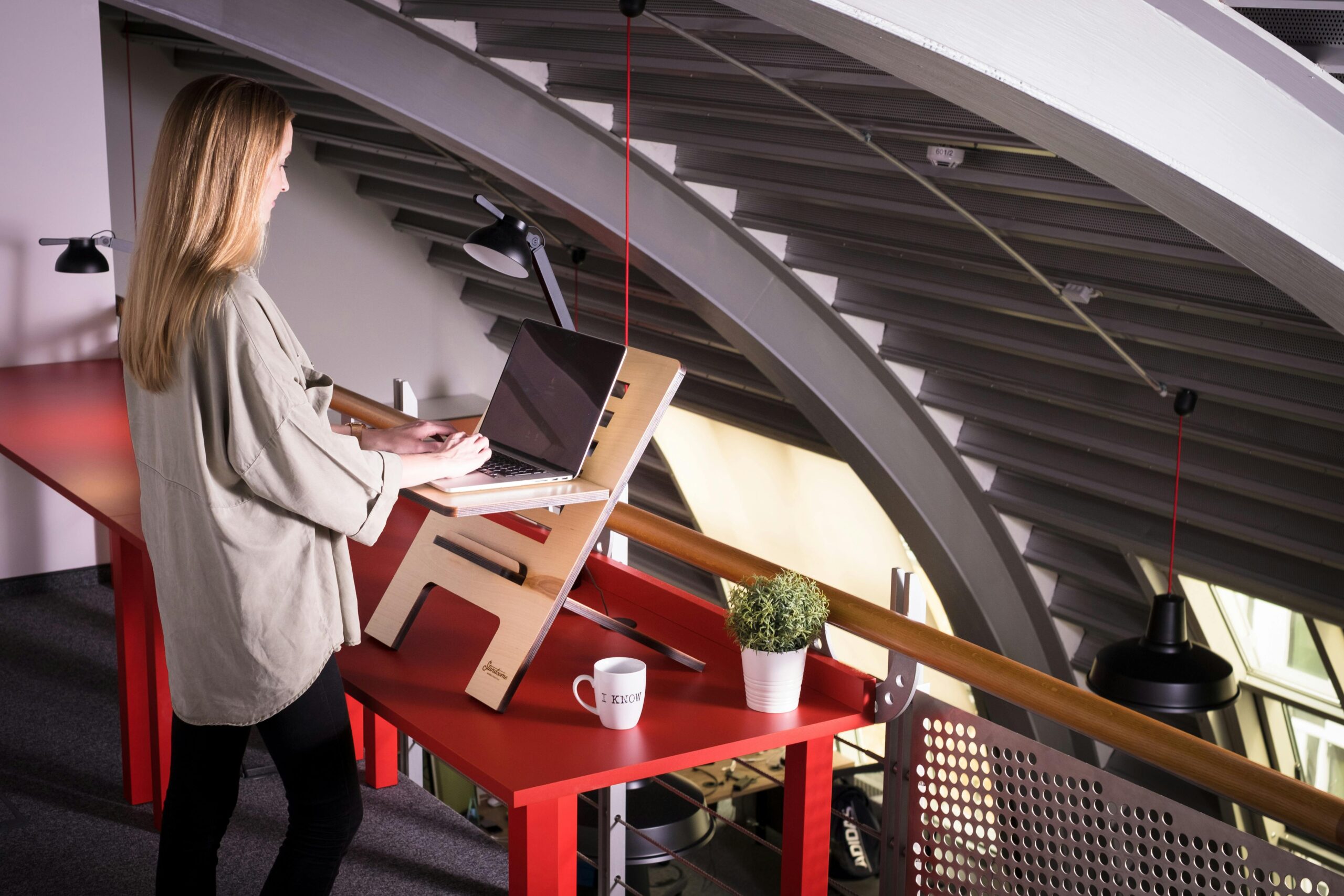
A desk riser is a simple tool that sits on top of your existing desk and lets you switch between sitting and standing while you work. It’s designed to improve posture, reduce long hours of sitting, and create a more flexible workspace without replacing your entire desk.
But the real question is not what a desk riser is it’s whether you actually need one. Many people buy it expecting instant comfort and productivity, only to realize later that it depends on how they work, how they set it up, and how consistently they use it.
This guide explains what a desk riser does, who benefits from it, and how to decide if it’s the right investment for your setup.
What Is a Desk Riser?
A desk riser (also called a standing desk converter) is a platform placed on top of your desk. It lifts your monitor, keyboard, and sometimes your laptop to a standing height.
Key Features
- Adjustable height
- Compact design
- No permanent installation
- Supports dual working positions (sit and stand)
Unlike full standing desks, desk risers are more affordable and easier to set up.
How a Desk Riser Works
Most desk risers use one of these mechanisms:
1. Manual Lift (Spring-Assisted)
You raise or lower it by hand with light support from internal springs.
2. Gas Lift Mechanism
Smooth height adjustment using a lever.
3. Electric Motor (Premium Models)
Adjusts height with the press of a button.
Desk Riser vs Standing Desk: Key Differences
| Feature | Desk Riser | Standing Desk |
|---|---|---|
| Cost | Lower | Higher |
| Setup | Easy | Requires assembly |
| Portability | High | Low |
| Space | Compact | Larger footprint |
Simple takeaway:
A desk riser upgrades your current desk. A standing desk replaces it.
Why People Use Desk Risers
1. Reduce Sitting Time
Long sitting hours are linked to:
- Back pain
- Poor posture
- Low energy
A desk riser allows you to stand periodically without changing your entire setup.
2. Improve Posture
When used correctly, a desk riser:
- Keeps your screen at eye level
- Reduces neck strain
- Aligns your spine better
3. Increase Flexibility During Work
Switching between sitting and standing can:
- Reduce fatigue
- Improve focus
- Break monotony
Do You Actually Need a Desk Riser?
This depends on your daily work habits.
You Likely Need One If:
- You sit more than 6–8 hours daily
- You experience back or neck discomfort
- Your current desk setup is not ergonomic
- You want a budget-friendly standing solution
You May Not Need One If:
- You already have an ergonomic setup
- You rarely work long hours at a desk
- You prefer a full standing desk upgrade
Real Benefits (Based on Practical Use)
1. Better Work Comfort
Users often report less stiffness after adding standing intervals.
2. Gradual Habit Change
You don’t need to stand all day. Even:
- 15–30 minutes per hour
can make a difference.
3. Cost-Effective Upgrade
Compared to replacing furniture, a desk riser is a low-risk investment.
Common Downsides You Should Know
1. Limited Workspace
Desk risers reduce usable desk space.
2. Stability Issues (Low-Quality Models)
Cheap risers may wobble during typing.
3. Adjustment Effort
Manual models require physical effort to adjust height.
How to Choose the Right Desk Riser
1. Check Weight Capacity
Ensure it can hold:
- Monitor
- Laptop
- Accessories
2. Look at Height Range
It should match your standing height comfortably.
3. Evaluate Surface Area
Make sure it fits your setup without overcrowding.
4. Stability Matters
A solid base prevents shaking during work.
5. Ease of Adjustment
Smooth adjustment improves daily usability.
Proper Desk Riser Setup (Critical for Results)
Monitor Position
- Top of screen at eye level
- About an arm’s length away
Keyboard Position
- Elbows at 90 degrees
- Wrists straight
Standing Posture
- Feet flat on the ground
- Shoulders relaxed
- Avoid leaning forward
Insider Tip:
Poor setup cancels out most benefits of a desk riser.
How to Use a Desk Riser Effectively
Follow a Sit-Stand Routine
Start with:
- 20 minutes sitting
- 10 minutes standing
Adjust based on comfort.
Don’t Stand All Day
Standing too long can cause:
- Leg fatigue
- Foot pain
Balance is key.
Use an Anti-Fatigue Mat
It reduces pressure on feet during standing sessions.
Desk Riser for Different Users
Remote Workers
Ideal for long working hours at home.
Students
Helps improve posture during study sessions.
Office Employees
A practical upgrade without changing office furniture.
Cost Range and Value
Budget Models
- $50 – $150
- Basic functionality
Mid-Range Models
- $150 – $400
- Better stability and features
Premium Models
- $400+
- Electric adjustment, larger surfaces
Value Insight:
Mid-range options usually offer the best balance.
Maintenance and Durability
Desk risers require minimal maintenance:
- Keep moving parts clean
- Avoid overloading
- Check stability periodically
High-quality models can last several years.
Common Mistakes to Avoid
1. Standing Too Much Too Soon
Start gradually to avoid discomfort.
2. Ignoring Ergonomics
Incorrect setup leads to new pain points.
3. Buying Cheap Without Research
Low-quality risers often fail quickly.
4. Not Measuring Desk Space
Incorrect size creates usability issues.
Insider Tips from Experienced Users
1. Test Before Full Use
Use it for a few hours daily before committing full-time.
2. Combine With Movement
Take short walks or stretch regularly.
3. Keep Frequently Used Items Close
Avoid reaching too far while standing.
4. Adjust Based on Task
Sit for typing-heavy tasks, stand for calls or reading.
Is a Desk Riser Worth It?
For most people who spend long hours at a desk, the answer is yes but only if used correctly.
It’s not a magic solution. It’s a tool that supports:
- Better posture
- Reduced sitting time
- Improved comfort
Final Decision Guide
Choose a desk riser if:
- You want a simple ergonomic upgrade
- You need flexibility without replacing your desk
- You’re willing to build a sit-stand habit
Skip it if:
- You already have an optimized setup
- You prefer a permanent standing desk solution







Leave a Reply